 Just Ask,
 How to connect OpenRouter
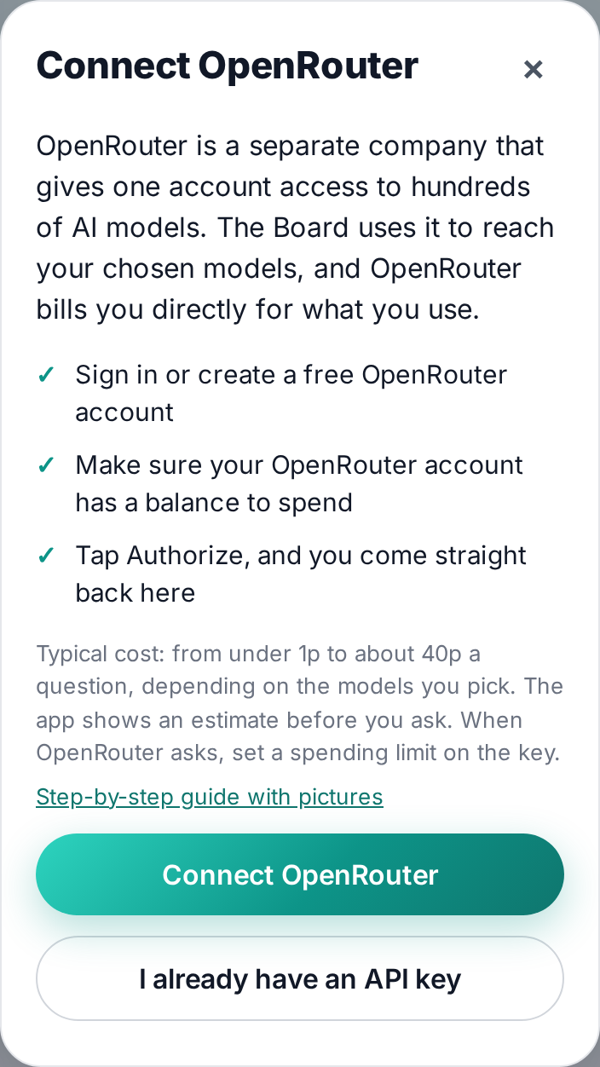
The Board reaches the AI models through OpenRouter, a separate company. You need a free OpenRouter account with some credit on it. OpenRouter then bills you directly for the AI you use, usually pennies a question.
Option 1: one tap (recommended)
Open The Board and tap Connect OpenRouter
You'll see it on first launch, after you agree to the privacy notice. You can also find it later in Settings (the cog icon, top right).
Sign in to OpenRouter, or create an account
A secure OpenRouter page opens inside the app. Sign in with Google, GitHub or email. We never see your password.
Set a spending limit, then tap Authorize
OpenRouter shows what The Board is asking for. If it offers a credit limit for the key, set one you're comfortable with (for example $5). That's the most the app can ever spend.
Come back to the app
You'll see "Returning to The Board…". On iPhone, if asked Open in "The Board"?, tap Open. If nothing happens, tap the Open The Board button on that page.
Check it worked
The app says OpenRouter connected, and your OpenRouter balance appears at the top of the screen. If it shows £0.00, add credit (see below).
Add credit to OpenRouter
- On a phone or computer, go to openrouter.ai and sign in.
- Open Settings → Credits and add credit with a card. OpenRouter sets its own prices and fees.
- Back in The Board, tap the balance at the top to refresh it.
How much do I need? A few pounds lasts most people a long time. A Value or Quickest board typically costs under 1p a question, and the most powerful boards around 40p. The app shows an estimate before you ask.
Option 2: paste your own API key
- On openrouter.ai, open Settings → API Keys and tap Create Key.
- Name it The Board and set a credit limit. Tap Create.
- Copy the key straight away. It starts with
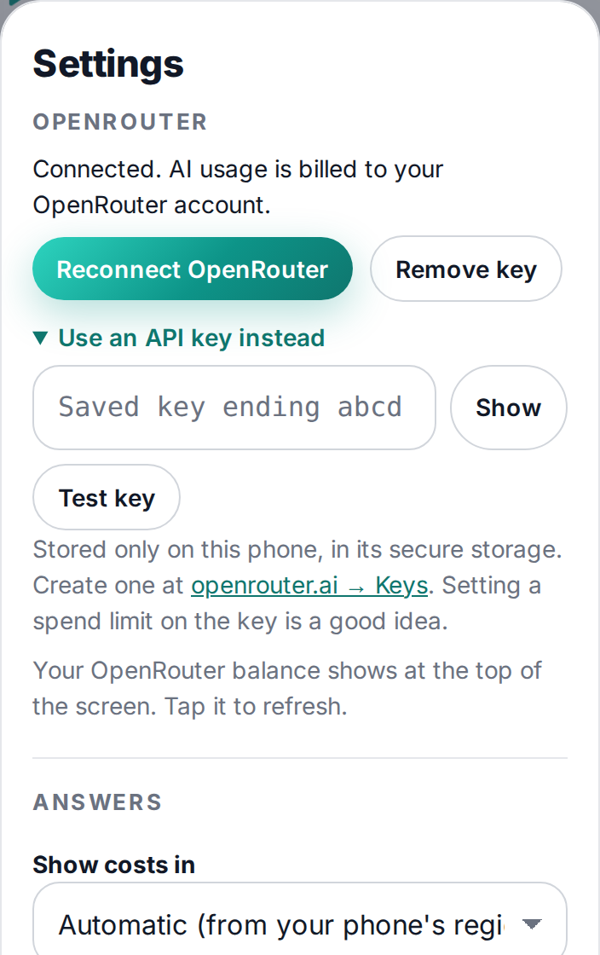
sk-or-and OpenRouter only shows it once. - In The Board, open Settings (cog icon) → Use an API key instead.
- Paste the key, tap Test key, then tap Save.
Keep your key private. Anyone with it can spend your OpenRouter credit. Don't email it, post it or send it to us. The Board stores it only in your phone's secure storage.
Stop, change or remove access
- Remove the key from this phone: Settings → Remove key.
- Stop the key working everywhere: on openrouter.ai, open Settings → API Keys and delete it.
- Delete everything the app holds: Settings → Withdraw consent and delete everything.
If something goes wrong
| You see | What to do |
|---|---|
| The app didn't reopen after Authorize | Tap Open The Board on the page. Still stuck? Close the page and tap Connect OpenRouter again; codes expire after a few minutes. |
| "That sign-in link has expired" | Tap Connect OpenRouter again and finish within 10 minutes. |
| "OpenRouter rejected the key" | The key was deleted or mistyped. Reconnect, or paste a fresh key. |
| "Your OpenRouter account is out of credit" | Add credit on openrouter.ai, or raise the key's credit limit. |
| "That doesn't look like an OpenRouter key" | Copy the whole key, starting sk-or-, with no spaces. |
Still stuck? Contact support.